Player guide
How to play Cube Jump Online
Đọc bằng tiếng ViệtCube Jump Online is controlled with quick left and right jumps. Each step asks you to react fast, keep rhythm, and avoid falling behind as the path changes. The longer you survive, the higher your score climbs.
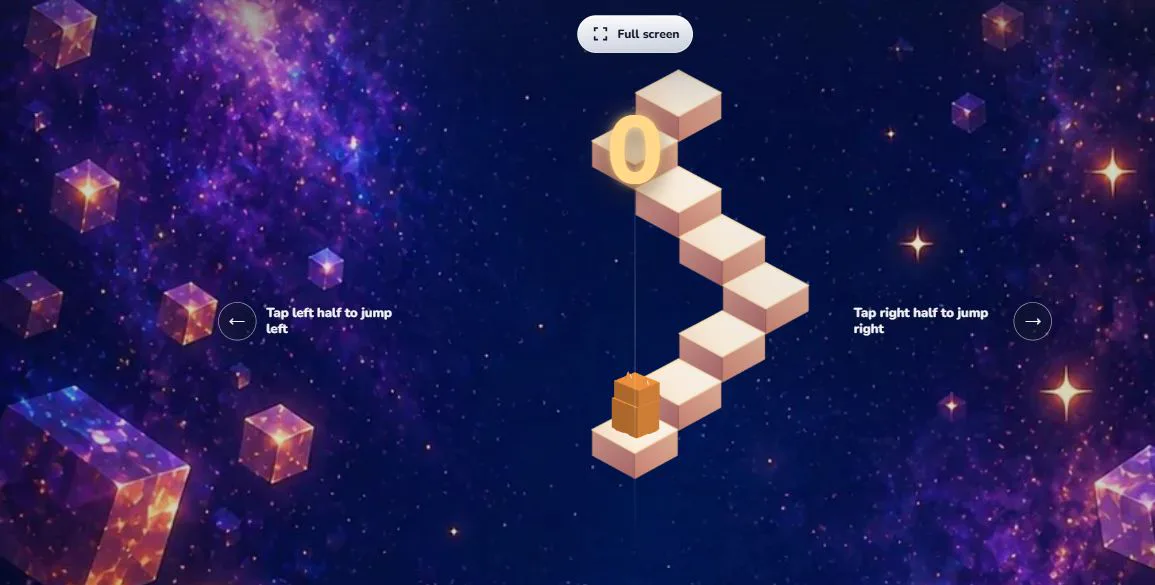
Basic controls
- On touch screens, tap the left side or right side of the screen to jump in that direction.
- On desktop, use the on-screen controls or supported keyboard/mouse input when available.
- Open the settings button on the home screen to change language, music, sound effects, and performance.
The control rule stays intentionally simple so the challenge comes from timing and route reading. A left input sends the cube toward the left branch of the path, and a right input sends it toward the right branch. If the next step is not in that direction, the run ends. New players should slow down mentally, watch the next visible step, and treat each jump as a small choice rather than tapping randomly.
Solo mode
Solo mode is the best place to practice. Your goal is to keep jumping from step to step while the game introduces more pressure. Checkpoints can appear during a run, giving you a clear progress target and a way to learn later sections of the course.
A useful practice habit is to replay the early section until the first few turns feel automatic. Once the rhythm is familiar, focus on the point where mistakes happen most often. Cube Jump rewards consistency: a run with calm, accurate jumps usually lasts longer than a run that starts fast but loses rhythm.
Online rooms
Online rooms let you create a room code and invite friends. Players join the same session, start the match, and compare progress while the room stays active. If a connection drops, the game tries to keep room state stable so players can continue where possible.
Before starting a room, make sure every player has joined and understands the controls. Room sessions work best when players use a stable connection and keep display names readable. If a room invite stops working, create a fresh room code from the home screen and share the new link.
Tips for better scores
- Focus on rhythm first. Fast taps without rhythm usually lead to mistakes.
- Watch the next safe step before jumping instead of reacting only to the cube.
- Use the performance setting if your device feels slow or the animation stutters.
- Practice solo checkpoints before joining competitive room sessions.
- Restart quickly after a mistake so your timing stays warm.
Unlocks and effects
Cube Jump Online includes visual rewards such as cube skins and background effects. These unlocks are cosmetic and do not replace skill: a better score still comes from cleaner timing and smarter jumps.
Common mistakes
- Looking only at the cube instead of reading the next step.
- Tapping faster after a mistake instead of rebuilding rhythm.
- Ignoring settings on older phones when the device starts to feel hot or uneven.
- Starting an online room before every player is ready.