Cube Effects
Visual Effects and Custom Style in Cube Jump Online
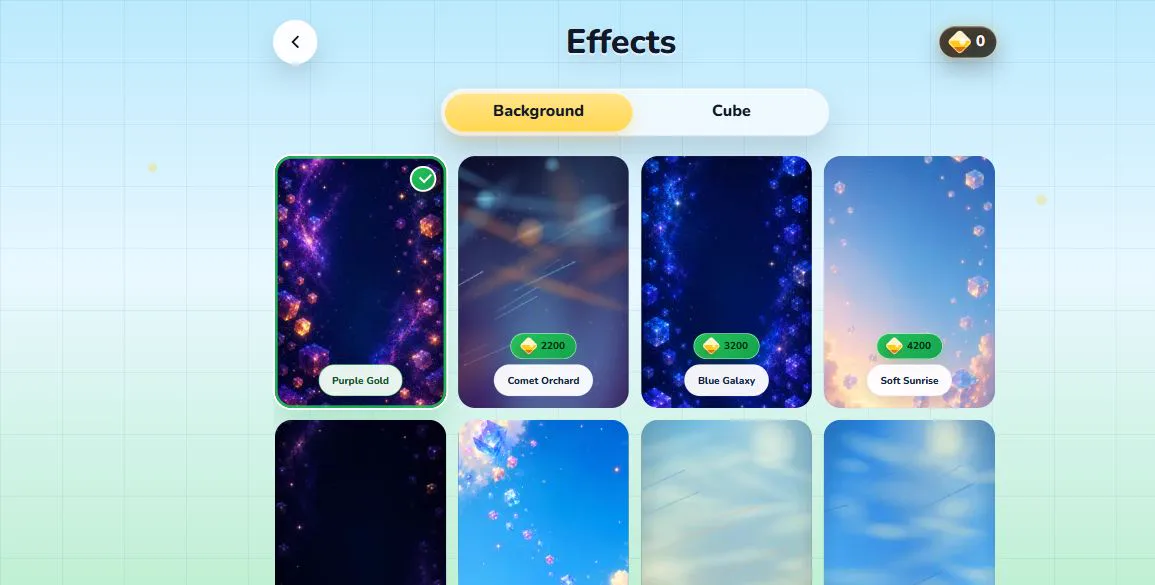
Đọc bằng tiếng ViệtCube Jump Online includes visual effects so players can personalize the look of a run while keeping the rules easy to understand. Effects can include cube styles and background themes. They are cosmetic: the player still needs to time jumps, read the next step, and keep rhythm as the game becomes faster.
Why Effects Matter
Arcade games often feel better when the player can make the screen feel a little more personal. A different background or cube style can make repeated practice feel fresh without adding complicated menus or changing the challenge. Cube Jump Online uses effects in that spirit. They support expression, but they do not replace the skill loop.
Good visual effects also need to stay readable. The player must be able to see the route, understand the cube position, and react to the next jump. Effects that distract from the path would work against the purpose of the game. Cube Jump Online keeps the focus on the run first and style second.
Cube Skins
Cube skins change the look of the player object. They can make the run feel more distinctive, especially when players return for short sessions throughout the day. A cube skin does not provide a hidden advantage. The same jump timing and route awareness are still required. If a player reaches a better score, it should come from cleaner play rather than a cosmetic change.
Background Styles
Background styles change the mood of the game screen. Some players prefer darker backgrounds because the route feels more focused. Others like brighter or more colorful styles because the run feels energetic. The effects menu lets players choose a look that feels comfortable for their device and taste.
Readability remains important on both desktop and mobile. If a background feels too busy on a small screen, players can switch to another style or adjust performance settings. The goal is to make the game pleasant to play, not to hide the path behind decoration.
Unlocking and Progress
Effects are connected to gameplay progress and cube rewards. This gives players a reason to keep improving without turning cosmetics into the main objective. The heart of Cube Jump Online remains the run itself: learn the timing, survive longer, and build confidence after each restart. Effects give that practice a sense of visible progress.
Performance Settings
Visual style should not come at the cost of basic playability. Cube Jump Online includes performance options so players can choose a lighter or smoother setup. On some devices, a lower frame-rate target may feel more stable. On stronger screens, a higher target may feel smoother. These settings let the player balance comfort, battery use, and responsiveness.
If the game ever feels slow or uneven, the best first step is to open settings and choose a performance preset that fits the device. Effects can then be chosen around that comfortable baseline.
Choosing a Clear Look
Players who are chasing a new best score may prefer a simple visual setup with strong contrast. A clear cube and readable background make it easier to focus on the next step. Players who are relaxing or showing the game to friends may prefer a more expressive look. Both choices fit the game as long as the route remains easy to read.
The best effect is the one that keeps the game comfortable for your screen, eyes, and device. Cube Jump Online is meant for quick browser play, so changing style should feel like a small personal touch rather than a complicated setup step before every run.